
CamelBee generates fully working Apache Camel microservices — Spring Boot or Quarkus (JVM and native) — with the architecture, dependencies, unit/integration/black-box tests, TestContainers, WireMock, Docker Compose, and embedded React UI already set up and passing. You don't think about how to wire Kafka, test gRPC, or configure DynamoDB. You just ask Claude Code to implement your business logic — and then watch it work in the embedded debugger UI.
From project generation to live debugging in minutes. Leave development to AI. React-based embedded UI included with every microservice.
Generate your microservice visually
Configure interfaces (REST, Kafka, WebSocket, etc.), define CRUD operations, and connect to backends. Download a complete, production-ready Apache Camel Maven project.
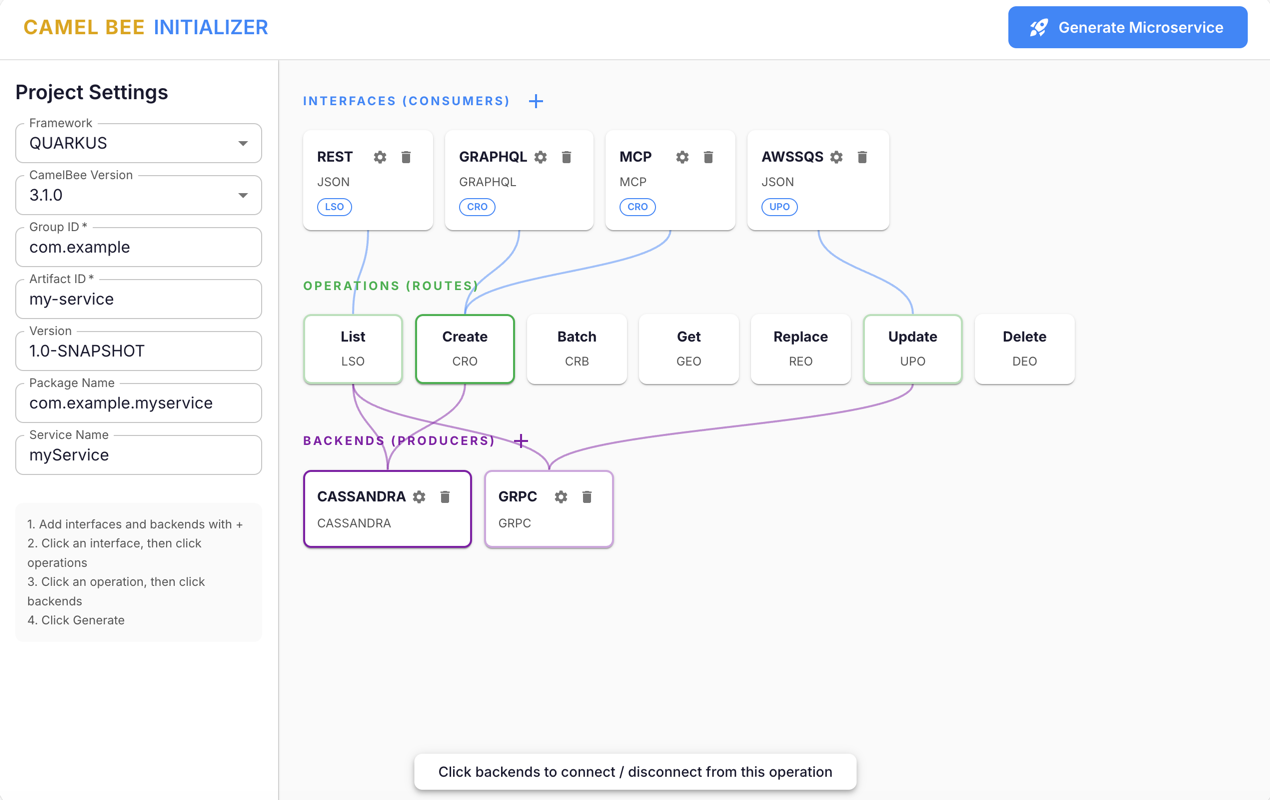 Launch Initializer
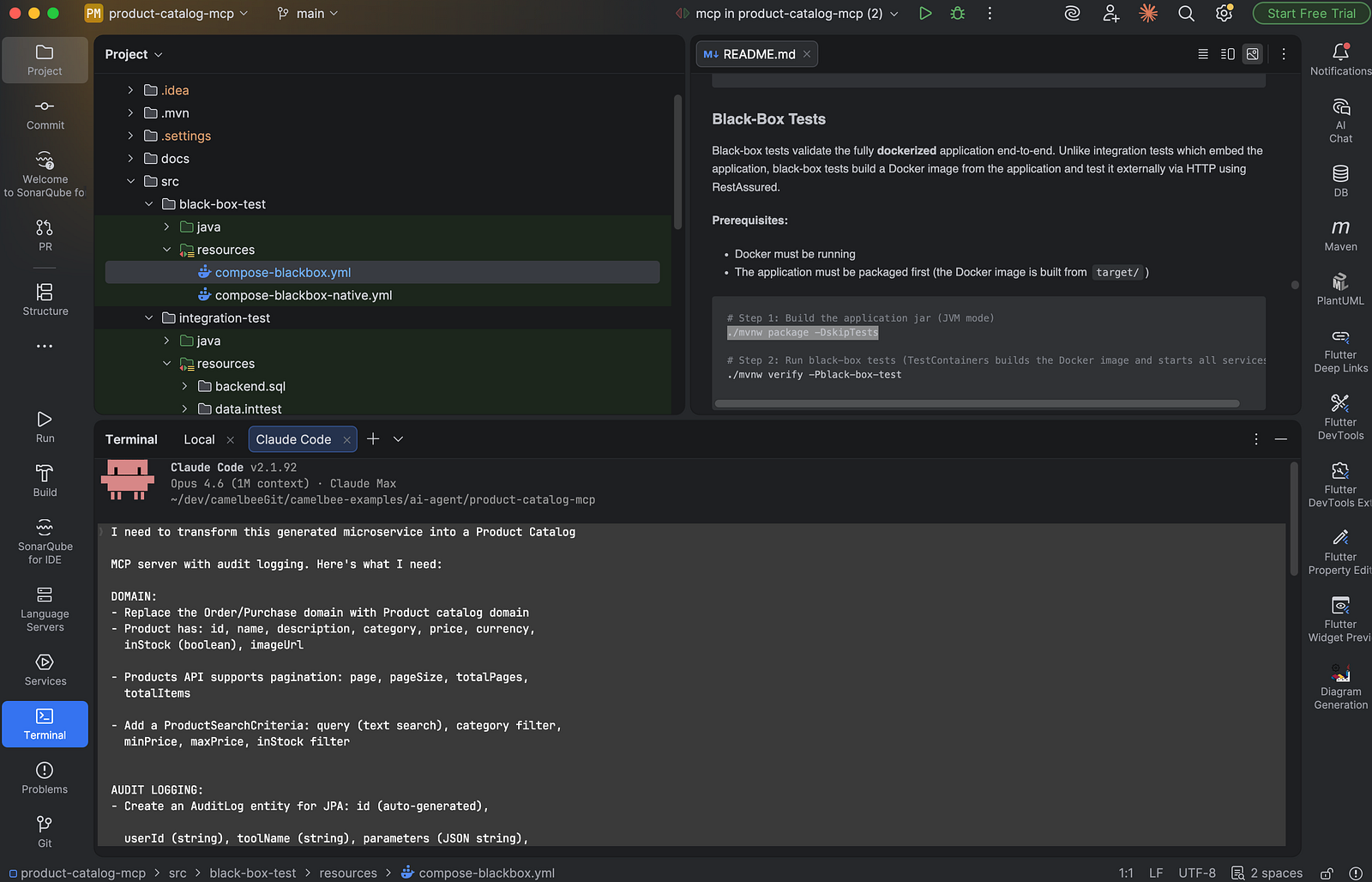
AI builds your microservice
Open the generated project in Claude Code. Describe your business logic in plain language — Claude Code implements routes, mappers, models, and tests following the exact architecture patterns.
Review it from the UI
See messages flowing through your Camel routes in real-time. Inspect payloads, trace transformations, and debug integration flows visually.
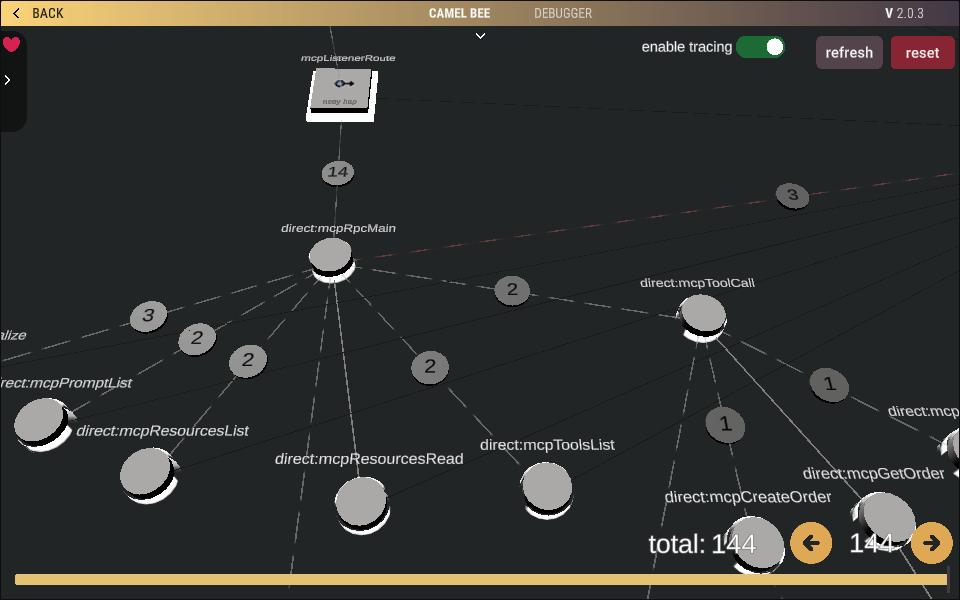
All three components — Initializer, Claude Code, and Debugger — work together to provide a complete development experience
CamelBee eliminates the entire setup burden. The architecture is defined. The dependencies are aligned. The tests are written — unit, integration, and black-box — with TestContainers, WireMock, Docker Compose, test data producers, and backend verifiers all wired up and passing. You open the project in Claude Code and simply describe what you want.
"Add an endpoint that validates the order total against the customer's credit limit before forwarding to the payment backend"
You describe the business requirement in plain language. No need to think about route structure, error handling patterns, MapStruct mappings, or test setup.
Claude Code knows the 3-layer architecture, the Camel DSL patterns, the framework rules (Spring Boot or Quarkus), and the test patterns — all from the auto-loaded rules and CLAUDE.md. It adds the route, the mapper, the model, and the unit + integration + black-box tests following the exact same patterns as the existing code.
Run /cb-run-tests to verify everything passes, then /cb-debug to launch the embedded debugger UI. Watch the message flow through your routes in real-time — see the request enter the consumer, pass through the central route, reach the backend, and return. Visual proof that it works.
No dependency research. No TestContainers configuration. No WireMock stub writing. No Docker Compose debugging. It's all there. You just describe what you need.
Two phases: Generate your starting point, then Evolve it safely with AI as your needs grow.
Pick interfaces (REST, Kafka, gRPC, MCP, etc.), backends, content types, and CRUD operations in the Initializer UI. Choose Spring Boot or Quarkus — Quarkus supports both JVM and native mode for serverless deployments.
Download a complete Maven project — Camel routes, MapStruct mappers, 3-level tests (unit, integration, black-box), Docker Compose, k6 load tests, and full Claude Code AI context.
Open in Claude Code. Replace the sample domain with your business entities, implement your logic, and let Claude Code run the tests. Everything works out of the box.
Need Kafka, gRPC, or a new database months later? Type /cb-add-interface or /cb-add-backend in Claude Code. It calls the CamelBee MCP Server, generates a reference project, and surgically adds only the new pieces into your existing microservice.
Claude Code follows the same architecture, same patterns, same test structure. New routes, models, mappers, Docker services, TestContainers configs, WireMock stubs, test data producers, and backend verifiers are all included in the reference — Claude Code copies them in, not invents them.
The embedded Debugger, Metrics, and Health UI run inside your microservice. Use /cb-debug to visualize message flows, inspect payloads, and trace requests through all your routes.
Every generated microservice ships with a complete Claude Code integration — slash commands, auto-loaded rules, a code reviewer agent, MCP server access, and pre-configured permissions. Claude Code doesn't just read your project. It knows how to build on it.
Type /cb-add-interface, /cb-add-backend, or /cb-add-operation and Claude Code handles everything — calls the MCP server for a reference, copies the right pieces, adapts to your domain, adds tests, and verifies nothing broke.
Also includes /cb-run-tests, /cb-debug, and /cb-review for testing, debugging, and architecture review.
The included .mcp.json connects Claude Code to the CamelBee MCP Server. When you need a new technology, Claude Code generates a reference project on-demand and extracts exactly what's needed — no manual downloading or copy-pasting.
Four rules files in .claude/rules/ load automatically based on what you're editing: route-architecture when editing routes, camel-dsl-patterns for Camel DSL, test-patterns for tests, and build-plugins for pom.xml.
Tailored to your selected interfaces and backends. Contains the architecture overview, build commands, critical rules (what to preserve vs. freely change), domain customization guide, and the full operations reference.
A dedicated .claude/agents/code-reviewer.md reviews code against CamelBee architecture rules — flags missing route IDs, wrong error handlers, broken layer isolation, missing tests, and anti-patterns.
.claude/settings.json pre-allows safe operations (build, test, Docker, git) so Claude Code can work without constant permission prompts. Dangerous operations are blocked by default.
The result: you generate once, then evolve safely. Add Kafka six months later, add gRPC next quarter — Claude Code gets the complete reference with all test infrastructure included, copies in exactly what's needed, and verifies everything passes. Less tokens, less time, fewer mistakes.
Define interfaces, operations, and backends — CamelBee generates complete Camel routes with clean object mappings and extensible business logic stubs.
Debugger, Metrics, and Health UI run directly inside your microservice. Watch messages flow, view performance metrics, and debug live traffic — no external tools needed.
Need a new interface or backend months later? Claude Code calls the CamelBee MCP Server, generates a reference, and adds the new technology into your existing microservice — same architecture, same patterns, nothing breaks.
Every technology comes with TestContainers, WireMock stubs, test data producers, backend verifiers, Docker Compose services, and k6 load tests — all pre-built and passing. AI follows existing patterns instead of inventing from scratch.
Choose your framework. Quarkus supports both JVM and native mode — native compiles to a native executable with sub-second startup, minimal memory, ready for serverless and Kubernetes. All tests are verified on native too.
All 19 interfaces and 18 backends ship with pre-built TestContainers configurations, WireMock stubs, Docker Compose services, test data producers, and backend verification utilities — verified on JVM and native executables. AI doesn't need to invent how to test Kafka, Cassandra, gRPC, or DynamoDB — it's all there, proven, and passing.
Choose your framework in the Initializer. Quarkus supports both JVM and native mode — same generated code, two deployment targets.
The most widely adopted Java framework. Mature ecosystem, broad library support, familiar to most teams. Full JVM with standard startup and memory profile.
Kubernetes-native Java framework. Faster startup than Spring Boot, lower memory usage, live reload with quarkus:dev. CDI-based dependency injection. Great for development and traditional deployments.
Sub-second startup. Minimal memory. The same Quarkus project compiles to a native executable via GraalVM — ideal for serverless (AWS Lambda, Azure Functions, Google Cloud Run) and Kubernetes scale-to-zero. All 19 interfaces and 18 backends are tested and verified on native.
CamelBee handles native compilation requirements automatically — reflection registration, serialization configs, and native-compatible Camel DSL patterns are all included in the generated code. No extra configuration needed to go native.
| Interfaces | Backends |
|---|---|
|
Currently Supported:
Coming Soon:
|
Currently Supported:
Coming Soon:
|
Stay up to date with the latest CamelBee tutorials, integration patterns, and deep-dives into Apache Camel microservice development — published regularly on Medium.
Read on Medium →You don't need to start from scratch! Add CamelBee's core libraries to your existing Apache Camel microservices and instantly unlock the Debugger, Metrics, and Health UI — all as a React embedded UI running directly inside your microservice.
Add the Spring Boot core library to your existing Camel application and start visualizing your routes immediately.
View Spring Boot Core →Integrate the Quarkus core library into your Camel Quarkus services for real-time debugging and performance monitoring.
View Quarkus Core →Simply add the dependency and your existing microservices will have the full CamelBee React embedded UI — Debugger, Metrics, and Health UI — for live debugging and monitoring
Generate today, evolve tomorrow. Start with the Initializer — add new technologies anytime with Claude Code.