Apache Camel is the open-source integration framework for connecting APIs, message brokers, databases, file systems, cloud services and language models. Choose what your service exposes and what it integrates with, and CamelBee generates a complete service rather than a skeleton — decided once and applied consistently across every interface and backend you add.
Every project ships ready for AI to extend — rules and commands for Claude Code, Cursor, Codex, OpenCode and Copilot, plus an embedded debugger that verifies generated code at runtime rather than by inspection.
Built for teams developing integration services. Every interface and backend is available at no cost.
Initializer — Configure the interfaces, backends and framework in the browser, then download a ready-to-run Maven project. The workflow is Spring Initializr's; the result is a working integration service rather than an empty skeleton.
MCP Server — An endpoint your AI assistant calls over the Model Context Protocol. Describe the service you need and the generated project appears in your workspace.
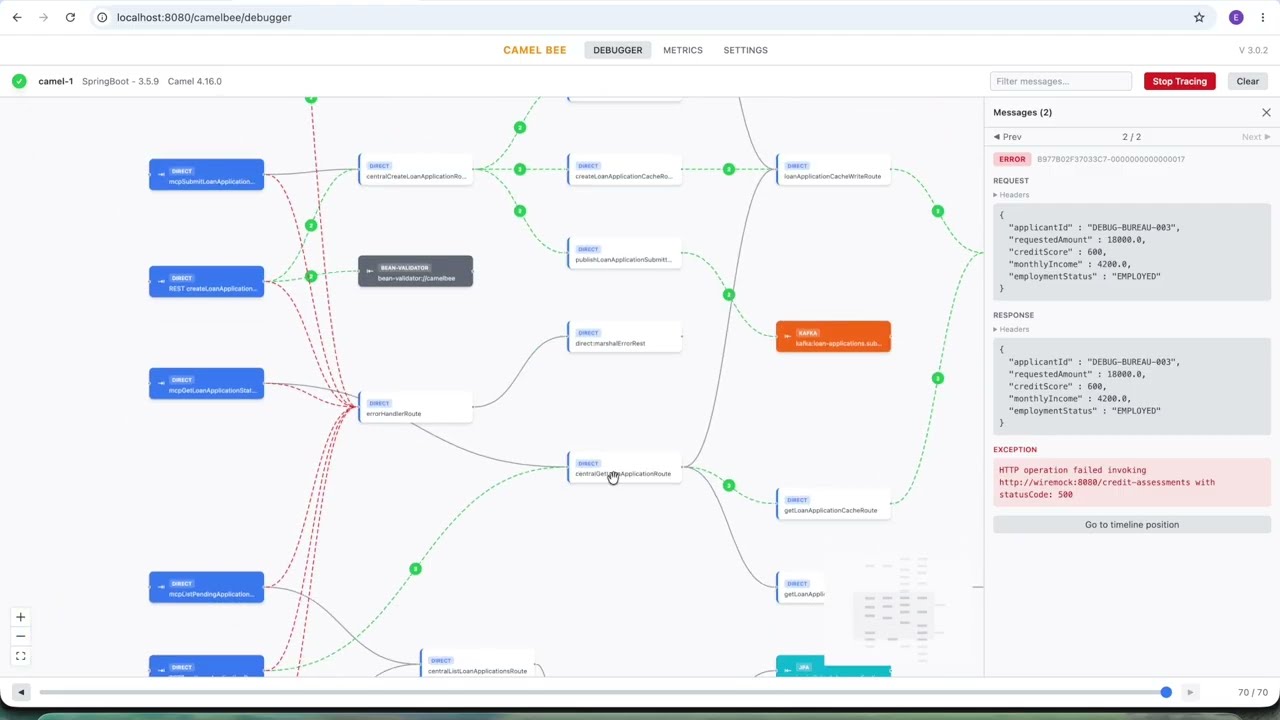
A short walkthrough: generate a microservice, then watch messages flow through your Camel routes in real time with the embedded debugger — review what AI-generated code actually does, instead of reading it line by line.
It can. An assistant will write Camel routes, and it will write unit, integration and black-box tests when you ask for them. The question is what that costs you, and what you are left holding afterwards.
Your assistant has to decide everything itself: how routes are layered, where mapping belongs, how errors propagate, how a Kafka consumer is tested, how a container is started and torn down. It makes those calls in isolation, differently every time, and it cannot verify most of them without running the code.
So it writes, runs, fails, reads the failure, and rewrites. That loop is longest exactly where it matters most — integration and black-box tests need real brokers and databases, correct wait strategies, seeded data, and the same credentials repeated in four places. Every iteration costs tokens, costs time, and can quietly land on a workaround instead of a fix.
What you end up with works, but its conventions exist nowhere except in that one conversation. The next feature starts the argument over.
The architecture is already decided and already demonstrated — every operation exists, wired end to end, in the pattern the rest of the project follows. The three test levels already pass against real containers. The rules and commands your assistant reads before it touches anything are in the repository.
So it does not design a test harness; it copies the one that already works. It does not guess how errors are handled; it follows the handler that is already wired in. It does not discover that Cassandra needs a wait strategy by watching a suite time out.
Adapting a working service to your domain is a smaller, far more reliable task than inventing one — fewer iterations, fewer tokens, and a project that still looks like itself after the tenth feature.
The point is not that AI cannot build a Camel microservice. It is that it should not have to rediscover the same architecture, the same test infrastructure and the same mistakes at your expense, on every project.
Two phases: Generate your starting point, then Evolve it safely with AI as your needs grow.
Two ways to generate: the visual Initializer in your browser, or directly from your AI tool via MCP.
Pick interfaces (REST, Kafka, gRPC, MCP, etc.), backends, and CRUD operations — in the Initializer UI, or by describing what you need to your AI tool (which calls the CamelBee MCP Server). Choose Spring Boot or Quarkus (JVM + native). You get a complete Maven project: Camel routes, MapStruct mappers, 3-level tests, Docker Compose, k6 load tests, and AI-tool context files.
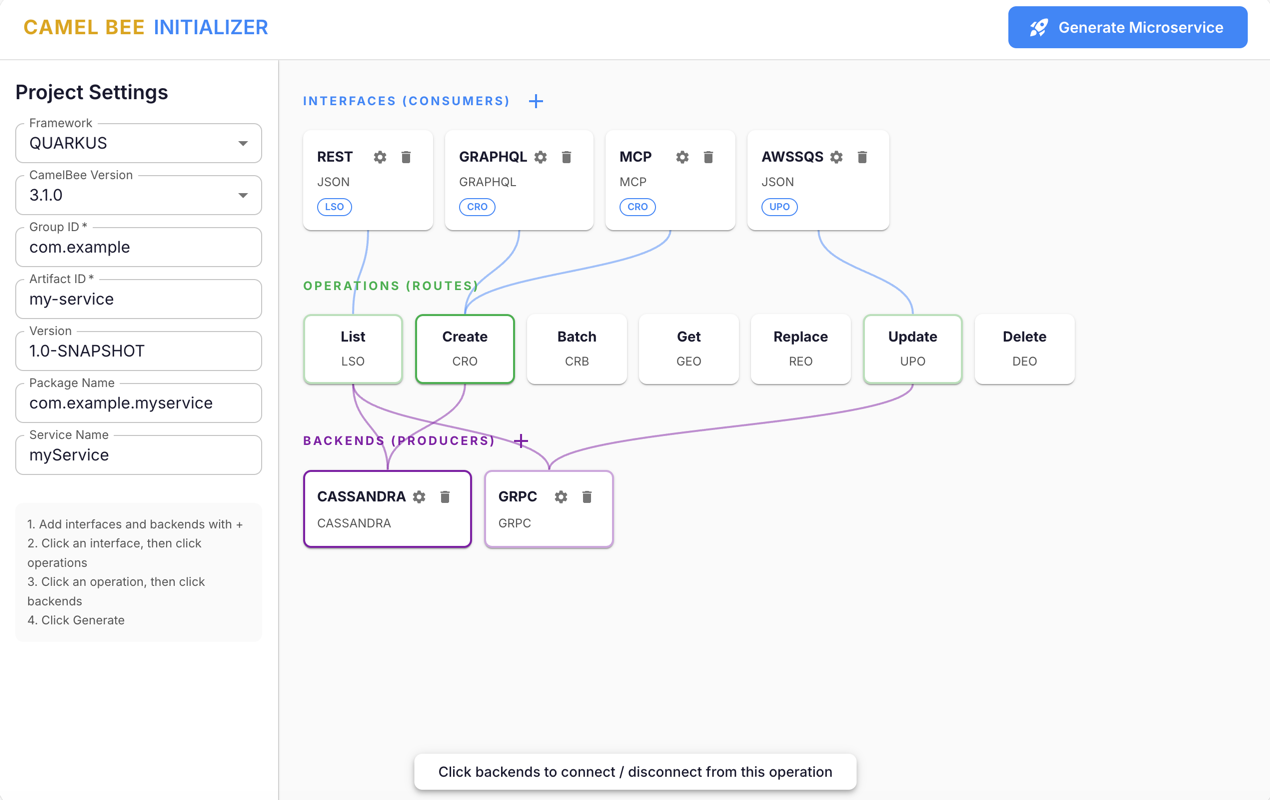 Launch Initializer
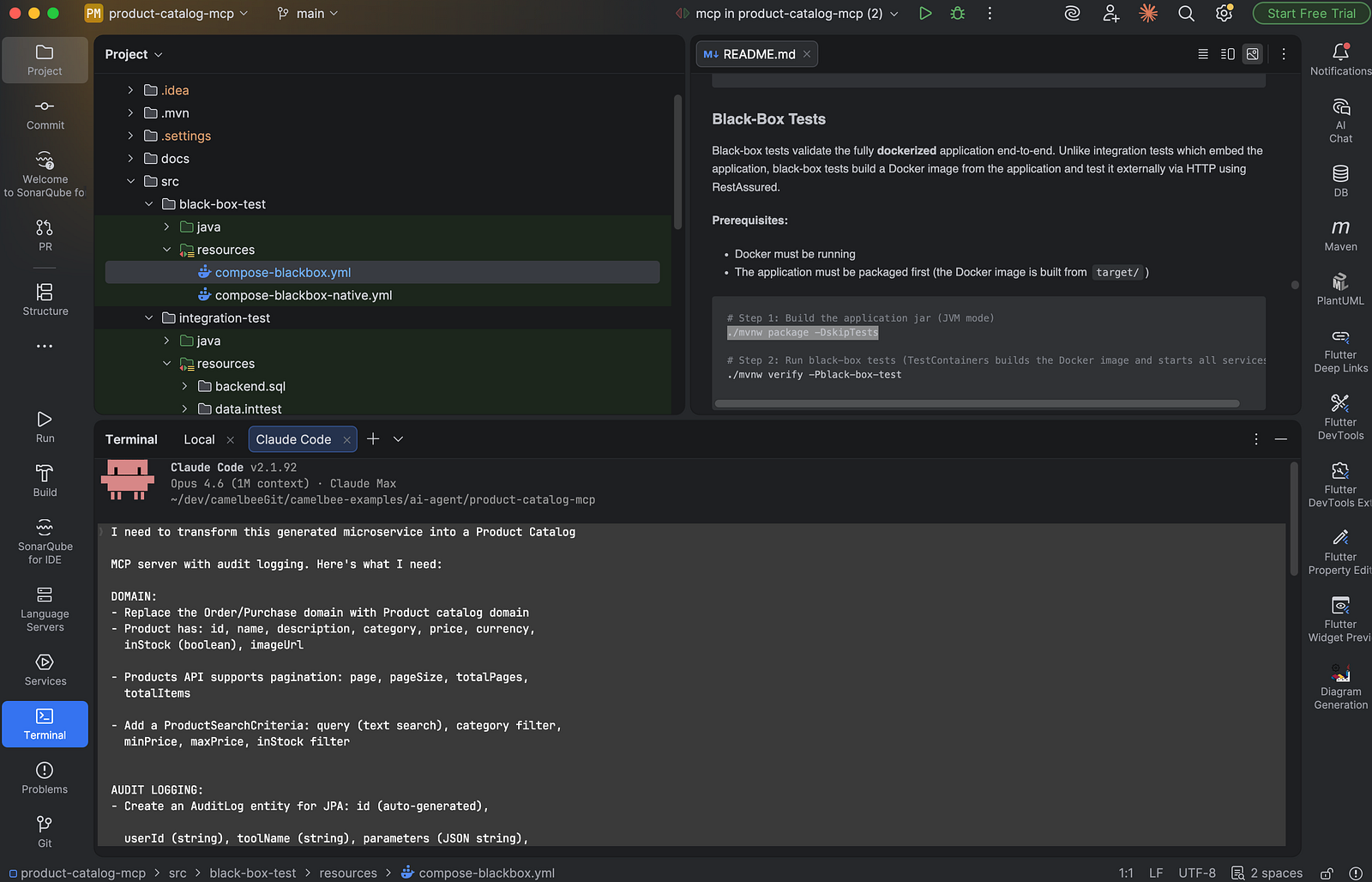
Open the project in your AI tool and just ask: "Replace the Order domain with Payment", "Add credit-limit validation before the payment backend", "Run the tests". The AI follows the 3-layer architecture, Camel DSL patterns, and test patterns shipped with the project — routes, mappers, models, and unit + integration + black-box tests, all consistent with the existing code.
The embedded React UI runs directly inside your microservice. Watch messages flow through your Camel routes in real-time, inspect payloads, and trace transformations — no external tooling needed. Run /cb-run-tests to verify everything passes, then /cb-debug to launch the debugger.
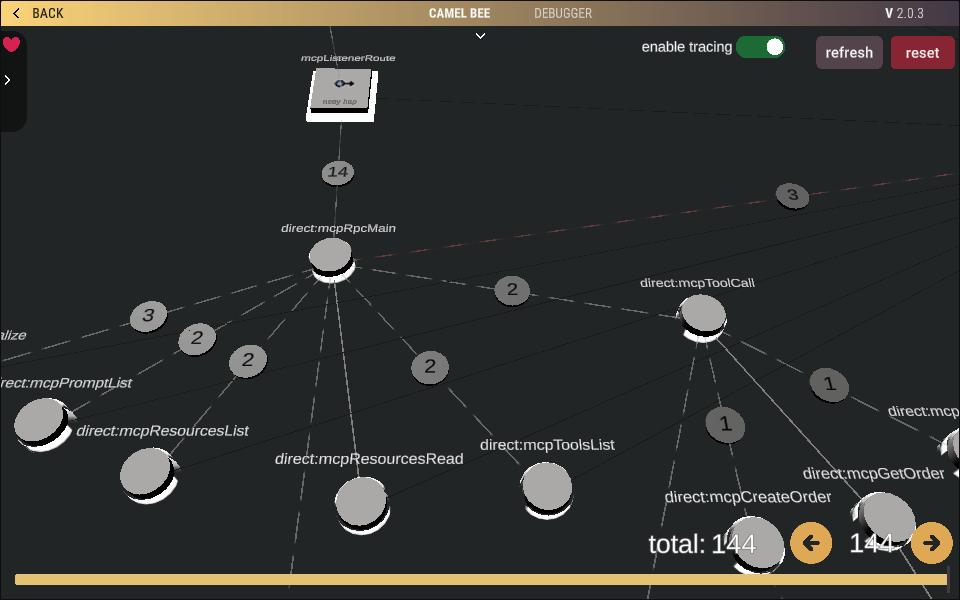
You start from a working microservice — not a skeleton.
See it in action: Product Catalog MCP server — generated from the Initializer, then built by Claude Code in 21 minutes from a single prompt (zero manual corrections). Read the walkthrough →
Need Kafka, gRPC, or a new database months later? Type /cb-add-interface or /cb-add-backend in Claude Code (or invoke the equivalent MCP tool from Cursor, Codex, OpenCode, or Copilot). It calls the CamelBee MCP Server, generates a reference project, and surgically adds only the new pieces into your existing microservice.
Your AI tool follows the same architecture, same patterns, same test structure. New routes, models, mappers, Docker services, TestContainers configs, WireMock stubs, test data producers, and backend verifiers are all included in the reference — the AI tool copies them in, not invents them.
The embedded Metrics and Health UI run inside your microservice in any environment — no separate Prometheus/Grafana stack to set up. Track route throughput, error rates, and per-endpoint latencies, and check liveness/readiness from the same React UI you used to debug.
Claude Code, Cursor, Codex, OpenCode, or Copilot — any AI tool that supports the Model Context Protocol can call the CamelBee MCP Server directly. Just ask: "Generate a Spring Boot or Quarkus microservice with Apache Camel routing — REST interface, Kafka backend, called orders-api" — you get a complete Maven project (routes, tests, Docker, embedded debugger UI) delivered straight into your workspace.
MCP endpoint: https://www.camelbee.io/mcp (HTTP streamable)
Get your API key:
cb_… key that appears.Drop this into your .mcp.json (or equivalent config) — works for Cursor, Codex, OpenCode, Copilot:
{
  "mcpServers": {
    "camelbee": {
      "type": "http",
      "url": "https://www.camelbee.io/mcp",
      "headers": {
        "Authorization": "Bearer YOUR_CAMELBEE_API_KEY"
      }
    }
  }
}
Claude Code users — use the mcp-remote bridge instead:
Claude Code's native HTTP MCP transport doesn't yet handle long-running tool calls; the mcp-remote npx bridge wraps the same endpoint over stdio and works today with no extra setup.
{
  "mcpServers": {
    "camelbee": {
      "command": "npx",
      "args": ["mcp-remote", "https://www.camelbee.io/mcp",
               "--header", "Authorization: Bearer YOUR_CAMELBEE_API_KEY"]
    }
  }
}
Once you've opened a generated project, your AI tool can also call the MCP Server to add new interfaces/backends later without re-generating from scratch.
Rules, slash commands, and architecture context tuned to CamelBee — so once the project is open in your AI tool, it doesn't just read your code, it knows how to build on it. Pick which tools via the aiTools setting, or take them all.
| AI Tool | Files shipped |
|---|---|
| Claude Code | .claude/ · CLAUDE.md · .mcp.json |
| Cursor | .cursor/ · AGENTS.md |
| Codex | AGENTS.md |
| OpenCode | .opencode/ · AGENTS.md · .mcp.json |
| GitHub Copilot | .github/copilot-instructions.md |
The test infrastructure is written once per technology rather than once per project, and it is verified on the JVM and on native executables. Whichever of the 21 interfaces and 23 backends you select, the containers, seed data, stubs and verifiers for it already exist — so neither you nor your AI tool has to work out how to test Kafka, Cassandra, gRPC or DynamoDB.
quality Maven profile, with optional SonarQube analysis when a token is suppliedChoose your framework in the Initializer. Quarkus supports both JVM and native mode — same generated code, two deployment targets.
The most widely adopted Java framework. Mature ecosystem, broad library support, familiar to most teams. Full JVM with standard startup and memory profile.
Kubernetes-native Java framework. Faster startup than Spring Boot, lower memory usage, live reload with quarkus:dev. CDI-based dependency injection. Great for development and traditional deployments.
Sub-second startup. Minimal memory. The same Quarkus project compiles to a native executable via GraalVM — ideal for serverless (AWS Lambda, Azure Functions, Google Cloud Run) and Kubernetes scale-to-zero. All 21 interfaces and 23 backends are tested and verified on native.
CamelBee handles native compilation requirements automatically — reflection registration, serialization configs, and native-compatible Camel DSL patterns are all included in the generated code. No extra configuration needed to go native.
Combine any of them. Each one arrives with its routes, mappers, configuration, container and test harness already written.
Cache vendors: Redis, Valkey, Infinispan, Caffeine. LangChain4j Agent providers: OpenAI, Anthropic, Mistral AI, Ollama — optionally with MCP tool access. LangChain4j Embeddings vector stores: Qdrant, Weaviate, PGVector, In-Memory. SQL and JPA vendors: PostgreSQL, MySQL, MariaDB, Oracle, SQL Server, DB2.
Example projects built from the CamelBee Initializer — full source on GitHub, with walkthrough posts on Medium.
📋 Prompt Recipes — Build Microservices with One Prompt
Copy-paste prompts for real use cases: Document Q&A with RAG, AI Support Ticket Triage, B2B File Exchange Gateway, Product Catalog MCP Server. Step 1: generate via CamelBee. Step 2: paste into your AI tool. No IDE required.
One prompt, zero manual corrections: Claude Code transformed a CamelBee-generated Quarkus project into a Product Catalog MCP server with audit logging, full test coverage, and native build — driven entirely by the structured guardrails in the generated CLAUDE.md.
A raw CamelBee-generated project, pushed to GitHub without a single modification, used to benchmark gRPC vs REST with Protocol Buffers vs REST with JSON. Out-of-the-box performance numbers from the generator — no optimization work required.
Why reading AI-generated code line by line doesn't scale — and how the embedded CamelBee Debugger lets you review what a microservice actually does by watching messages flow through its Camel routes in real time.
Read on Medium →Stay up to date with the latest CamelBee tutorials, integration patterns, and deep-dives into Apache Camel microservice development — published regularly on Medium.
Read on Medium →You don't need to start from scratch! Add CamelBee's core libraries to your existing Apache Camel microservices and instantly unlock the Debugger, Metrics, and Health UI — all as a React embedded UI running directly inside your microservice.
Add the Spring Boot core library to your existing Camel application and start visualizing your routes immediately.
View Spring Boot Core →Integrate the Quarkus core library into your Camel Quarkus services for real-time debugging and performance monitoring.
View Quarkus Core →Simply add the dependency and your existing microservices will have the full CamelBee React embedded UI — Debugger, Metrics, and Health UI — for live debugging and monitoring
Generate today, evolve tomorrow. Start with the Initializer — add new technologies anytime from your AI tool.